
Construction Drawing Management,From Markup to Close‑Out.
Cloud-based plan markup for construction teams: pin issues to the exact spot on the drawing, assign them to the sub who owns the fix, and track every item to resolved — on any phone or browser.
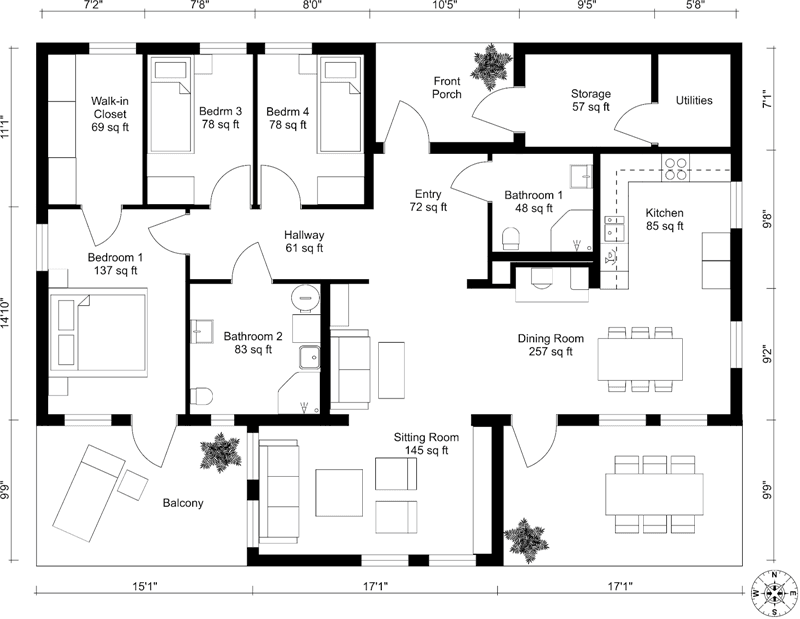
Floor plan collaboration for construction teams
One shared set of drawings for the GC, the architect, and every sub. Upload the PDF, sort the sheets, pin the issues, and close them out — four steps, no training.
Upload your drawings
Drop your construction PDF. Every floorplan shows up in seconds.
Sort your floorplans
Floor plans, elevations, details. Each page classified by type.
Mark up the issues
Redline the sheet, pin a comment on the drawing, and assign it to the right sub.
Close it out
Resolve the issue, export the marked-up sheet for your RFI, and move on.
Replace printouts, emails, and spreadsheets
Construction drawing management built for the way your crew actually runs a job.
Punch list tracking, pinned to the drawing
Walk the site, spot an issue, and pin it to the exact location on the plan. Tag the responsible sub and they will see it the moment they open the plan. No more printed redlines.
Construction collaboration on one shared plan
Invite subs, architects, and the GC to mark up the same drawing. Share view-only links with owners, inspectors, or anyone who just needs to see the plan — no account, no install. Lock guests to specific layers when scope matters.
RFIs and site questions pinned to the plan
Your super spots a conflict on site, pins a photo to the drawing, and tags the architect. The reply thread stays attached to that exact spot — no lost emails, no guessing which drawing they meant. Export the marked-up sheet and the issue is documented.
Scope each trade to their own layer
Electrical, plumbing, HVAC, structural, fire protection. Each trade gets a separate layer so your subs only see their scope, and the GC toggles between all of them — trade coordination without the Monday meeting.
Drawing management that sorts itself
Upload a 200-page PDF set and every sheet is split, classified, and named — floor plans, elevations, sections, details. The right sheet is two taps away, and the whole crew works from the same current set.
A construction plan viewer in every pocket
Full drawings on any phone or tablet, right at the job site. Pinch into a detail, measure on the sheet, and pull up the plan without walking back to the trailer — no install, no license per device.
Built for your role
Every role on the job uses plans differently. We built for all of them.
Run every trade from one screen
- Coordinate every trade partner on one shared drawing set
- Pin punch list items to the exact spot on the plan
- Track what is resolved and what still needs work
Get field feedback on your actual drawings
- RFIs and site questions arrive pinned to the drawing
- Answer from your desk — the thread stays on the sheet
- Title blocks read and the set sorted for you
Know where every job stands
- Dashboard across all your active projects
- Control access so subs only see their scope
- Every markup is timestamped with a name attached
See your scope, mark it up, move on
- Only your trade layer shows up, nothing else
- Works on your phone right at the job site — no install
- Snap a photo and pin it to the plan in seconds
From permit set to punch-out on every home
- Track new builds and remodels side by side
- Punch lists per home for walkthroughs and close-out
- Export marked-up plans for the owner at handoff
Watch progress without chasing your builder
- View-only link — no account, no software to learn
- See exactly what got flagged and what got fixed
- Photos of the work pinned to the actual floor plan
Dedicated workflows for general contractors, architects, project managers, and 30+ trades — from HVAC contractors to electricians.
One plan. Everything your crew needs.
No tiers, no feature gates, no enterprise lock-in. Every seat gets the full platform.
Everything included
- Unlimited projects and drawing sets
- Automatic floorplan sorting
- Punch list and markup tools
- Plan reviewComing soon
- Trade-specific layers
- Role-based access for your crew
- Share with unlimited guestsComing soon
- Export marked-up plans for RFIs
- Works on phones, tablets, and desktop
- Priority support
Need a custom plan for a large team? Let's talk